
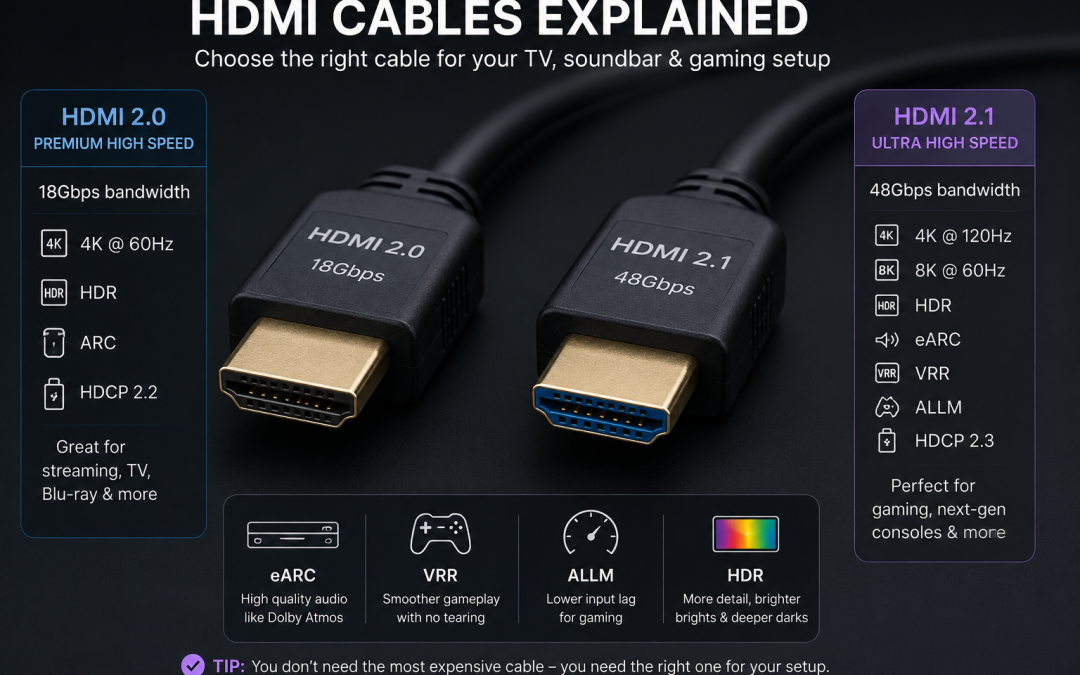
A lot of people still get told they need an expensive HDMI cable when they buy a new TV, soundbar or gaming console.
Sometimes they do need a new cable.
But they usually do not need the most expensive one.
The important question is not:
How much does the HDMI cable cost?
The better question is:
Is this the right HDMI cable for what I want it to do?
That is where most of the confusion starts.
A HDMI cable used for an old DVD player is not doing the same job as a HDMI cable used for a PS5, Xbox Series X, 4K 120Hz TV, Dolby Atmos soundbar, eARC connection or long cable run through a wall.
So the cable can matter.
But spending more money does not automatically mean you get a better picture.
HDMI cables are not all the same
It is easy to hear people say, “HDMI cables are all the same.”
That is not quite right.
Different HDMI cables can support different bandwidths and features. Some are made for older HD and 4K use. Some are made for higher-bandwidth features like 4K 120Hz, 8K, VRR, HDR and eARC.
So there is a difference between HDMI cables.
But that does not mean the expensive one is automatically better.
Once the cable is the correct type and supports the signal properly, paying more does not make the picture sharper, the colours better, or the sound more detailed.
A HDMI cable either carries the digital signal properly, or it does not.
If it cannot handle the signal, you may get problems like:
- no picture
- black screen
- flickering
- signal dropouts
- sound cutting in and out
- Dolby Atmos not working
- 4K 120Hz not showing
- unsupported format messages
- devices not talking to each other properly
That is different from saying an expensive cable gives you a better-looking image.
The right version matters more than the price
This is the simplest way to look at it.
You do not need an expensive HDMI cable.
You need the right version for what you want it to do.
A correctly certified HDMI 2.1 cable that costs $20 can do the same job as a HDMI 2.1 cable that costs $200. You do not get a better picture just because the cable cost more. It either carries the signal properly, or it does not.
That is the part many customers are not told clearly.
There can still be reasons to buy a better-built cable. A cable might be more flexible, stronger, thinner, better suited for a long run, or easier to fit behind a wall-mounted TV.
But that is different from picture quality.
A more expensive cable does not make Netflix sharper, Foxtel clearer, or your PS5 graphics better if a cheaper certified cable already supports the same signal.
HDMI 2.0 and HDMI 2.1 explained simply
For most people, the two HDMI cable types they hear about are HDMI 2.0 and HDMI 2.1.
You do not need to know every technical detail, but the basic difference matters.
HDMI 2.0 is commonly used for many normal 4K TV setups. It can be fine for 4K viewing at normal frame rates, streaming devices, Foxtel boxes, Blu-ray players and general TV use.
HDMI 2.1 is the newer and higher-bandwidth option. It is the one people usually talk about for newer gaming consoles, 4K 120Hz, VRR, eARC and higher-performance TV setups.
If you have a modern TV, soundbar, PS5, Xbox Series X or gaming PC, HDMI 2.1 is usually the safer choice.
That does not mean every device needs HDMI 2.1.
If you are just connecting an older Foxtel box, basic streaming device or older Blu-ray player, HDMI 2.0 may still work perfectly well.
But if you are buying a new cable now, especially for a wall-mounted TV or soundbar setup, it usually makes sense to buy a certified Ultra High Speed HDMI cable so you are not limited later.
What is an Ultra High Speed HDMI cable?
An Ultra High Speed HDMI cable is the cable normally linked with HDMI 2.1 features.
This is the type of cable people usually want for:
- 4K 120Hz gaming
- PS5
- Xbox Series X
- newer gaming PCs
- 8K TVs
- eARC soundbar connections
- VRR
- ALLM
- high-bandwidth HDR signals
- modern TV and soundbar setups
Some of those terms can sound more complicated than they need to.
eARC is the newer version of ARC. ARC can send sound from the TV back to a soundbar or receiver, but eARC can carry higher-quality audio formats and is more suitable for Dolby Atmos and newer soundbar setups.
VRR stands for Variable Refresh Rate. It is mainly useful for gaming because it helps the TV and console match each other more smoothly, which can reduce screen tearing or stuttering.
ALLM stands for Auto Low Latency Mode. It lets the TV automatically switch into a lower-delay game mode when it detects a compatible console.
HDR stands for High Dynamic Range. It allows compatible TVs and content to show a wider range of brightness and colour, so bright scenes, dark scenes and highlights can look more realistic.
You do not need to remember every technical term. The main point is that newer TVs, soundbars and gaming consoles often need more than an old basic HDMI cable if you want all of these features to work properly.
If you see a cable advertised as “8K HDMI” or “48Gbps HDMI,” it is usually trying to describe this type of cable.
But again, do not just buy the most expensive one.
Look for a certified cable from a reputable brand, and make sure it supports the features you actually need.
HDMI 2.2: should you worry about it now?
HDMI 2.2 is starting to be discussed, but for most home TV setups, it is not something to panic about right now.
Most current TVs, soundbars and gaming consoles are still built around HDMI 2.1 features.
For normal homes, HDMI 2.1 is still the practical standard to understand. It covers the things most people care about now: 4K 120Hz, eARC, VRR, gaming consoles, modern soundbars and high-quality video formats.
HDMI 2.2 may become more important later for future TVs, monitors and higher-performance devices.
But if you are setting up a TV, soundbar, Foxtel box, Apple TV, PS5 or Xbox today, the real-world question is usually still:
Do I have the right HDMI 2.1 / Ultra High Speed HDMI cable, and is everything plugged into the right ports?
ARC and eARC are where many HDMI problems start
A lot of HDMI issues happen with soundbars.
The common problem is ARC or eARC.
ARC stands for Audio Return Channel. eARC is the newer version, Enhanced Audio Return Channel.
The idea is simple: the TV can send sound back down the HDMI cable to the soundbar.
That is useful because it usually allows the soundbar to work better with the TV. In many setups, it also lets you control the soundbar volume with the TV remote.
But ARC and eARC can be confusing because everything has to match.
You need:
- the correct HDMI port on the TV
- the correct HDMI port on the soundbar
- a suitable HDMI cable
- the right sound settings on the TV
- the right settings on the soundbar
- compatible devices if you are using Dolby Atmos or other higher-quality audio formats
A better HDMI cable will not fix the problem if the soundbar is plugged into the wrong HDMI port.
The TV might have four HDMI ports, but only one of them may be marked ARC or eARC. That is the one that usually needs to be used for the soundbar.
HDMI input and HDMI output on soundbars
Soundbars can confuse customers because some of them have HDMI input and HDMI output.
The HDMI output is usually the one that goes to the TV, often marked ARC or eARC.
The HDMI input may be used for a device like a Foxtel box, Apple TV, Blu-ray player, PS5 or Xbox.
But this does not mean every soundbar can pass through every video signal properly.
If you plug a device into the soundbar first, then from the soundbar to the TV, the soundbar also has to support the video format you are trying to pass through.
For example, if you want 4K 120Hz gaming, Dolby Vision, HDR, or certain high-bandwidth formats, the soundbar has to be able to pass that signal through to the TV.
If it cannot, you may be better off plugging the device directly into the TV and using eARC to send sound back to the soundbar.
This is where a lot of people get caught.
They think the HDMI cable is the problem, but the real limitation may be the soundbar’s HDMI passthrough.
Optical cable vs HDMI for soundbars
Optical cables still work for some soundbar setups.
But HDMI is usually the better option when the TV and soundbar support it.
The main benefits of HDMI ARC/eARC are:
- better TV remote control integration
- support for more advanced audio formats
- cleaner setup with fewer cables
- better compatibility with newer TVs and soundbars
- Dolby Atmos support in the right setup
Optical can still be useful if the TV or soundbar is older, or if HDMI ARC is causing compatibility issues.
But for most modern TV and soundbar installations, HDMI ARC or eARC is usually the preferred connection.
The important thing is that the TV, soundbar, cable and settings all have to be correct.
Dolby Atmos and HDMI cables
Dolby Atmos is another area where people get confused.
A customer might buy a Dolby Atmos soundbar, connect it to the TV, and then wonder why Atmos is not working.
The HDMI cable may be part of the problem, but it is not the only thing to check.
Dolby Atmos depends on:
- whether the soundbar supports Atmos
- whether the TV supports Atmos passthrough
- whether the app or device is sending Atmos
- whether the HDMI port is ARC or eARC
- whether the cable is suitable
- whether the TV sound output settings are correct
- whether the subscription/app actually includes Atmos
A new HDMI cable by itself does not create Dolby Atmos.
It only helps carry the signal if the rest of the setup supports it.
Gaming consoles: PS5, Xbox and HDMI 2.1
Gaming is one of the main reasons HDMI cables matter more now.
A PS5 or Xbox Series X can support features like 4K 120Hz, HDR, VRR and low-latency gaming.
But to get those features, everything in the chain has to support them.
That means:
- the TV must support the feature
- the correct HDMI port must be used
- the cable must support the signal
- the console settings must be correct
- the game itself must support the feature
- any soundbar or receiver in between must support passthrough
This is why people sometimes buy a new TV and console, plug everything in, and still do not get 4K 120Hz.
It may not be the console.
It may not be the TV.
It may not even be the cable.
It may be the wrong HDMI port, a TV setting, or a soundbar in the middle that cannot pass the signal through.
Not every HDMI port on the TV is the same
This is a big one.
Some TVs have multiple HDMI ports, but not all ports support the same features.
One HDMI port might support ARC or eARC. Another might support 4K 120Hz. Some TVs only support full gaming features on certain ports.
So if you plug a PS5, Xbox or soundbar into the wrong port, you may not get the result you expected.
The TV may still show a picture, but it may not give you the best features.
That is why the HDMI cable is only one part of the job.
You also need to know which port to use.
Foxtel and HDMI problems
HDMI problems are not only about gaming consoles.
Foxtel can also create confusion, especially with Foxtel HD, Foxtel 4K, receivers and soundbars.
A Foxtel HD channel does not become clearer because you buy a more expensive HDMI cable. If the HDMI cable is already carrying the HD signal properly, the picture quality is mostly coming from the Foxtel source, the box settings, the TV processing and the size of the screen you are watching it on.
A larger modern TV can make Foxtel HD look softer than customers expect because the same picture is being stretched across a much bigger screen.
Foxtel 4K is different.
For Foxtel 4K, the cable and device chain need to support the required 4K signal. Foxtel says Ultra HD needs an iQ5 or iQ4 box, an eligible package, a HDMI 2.0 cable, and a compatible 4K TV that supports HDMI 2.0, HDCP 2.2 and 3840 x 2160 at 50Hz.
So the issue is not that you need a very expensive cable, and it is not that Foxtel 4K needs HDMI 2.1. The issue is that the whole chain has to support the Foxtel 4K signal.
This becomes a common problem when a Foxtel box is connected through an older receiver.
Many receivers have multiple HDMI inputs and one HDMI output to the TV. That can be convenient because all the devices go into the receiver and one cable goes to the TV. But if the receiver does not support 4K passthrough, HDCP 2.2, HDR or the required HDMI format, it can block the Foxtel 4K signal even if the TV and Foxtel box are capable of showing it.
In that case, replacing only the HDMI cable may not fix the problem.
The receiver may be the limiting point in the chain.
Sometimes the better option is to connect the Foxtel box directly to the TV and send sound back to the receiver or soundbar using ARC, eARC or another suitable audio connection, depending on the equipment.
Long HDMI cables and wall-mounted TVs
Wall-mounted TVs can need longer HDMI cables than customers expect.
A lot of people measure the distance in a straight line from the TV to the cabinet and think a short cable will be enough.
But when cables are hidden behind the wall, the path is different.
The cable may need to go:
- from the HDMI port on the TV to the wall entry point
- down inside the wall cavity
- out through the lower wall plate
- then back up or across to the device inside the cabinet
That extra length matters.
For many wall-mounted TV installations, a 3-metre HDMI cable is commonly needed. A shorter cable might look fine on paper, but once the TV is mounted and the cable path is hidden, it may not reach comfortably.
This is especially important if the TV inputs are on one side and the wall entry point is somewhere else.
The cable needs enough slack to be connected properly without being pulled tight.
Long cable runs can be different from short cable runs
Short HDMI cables are usually simple.
Long HDMI cables are where problems become more likely.
If you are running HDMI through a wall, across a room, through a ceiling, or from a cabinet to a projector, cable length and cable type matter more.
For longer runs, a normal copper HDMI cable may not always be the best choice. In some cases, an optical HDMI cable or active HDMI cable may be needed.
This is not about buying the most expensive cable in the shop.
It is about buying the right cable for the distance and signal.
A short HDMI cable behind a TV and a long HDMI cable through a wall are not the same job.
Can an expensive HDMI cable improve picture quality?
No.
If two HDMI cables are both correctly rated for the same signal and both are working properly, the more expensive cable will not give you a sharper picture, better colour or better sound.
HDMI is a digital connection. The cable either carries the signal properly, or it does not.
What can happen is that the wrong cable, an old cable, a damaged cable, a very long cable, or a poorly made cable may fail with higher-bandwidth signals. That can cause black screens, flickering, dropouts, unsupported-format messages, loss of 4K 120Hz, or audio problems.
In that situation, changing to a better cable can fix the problem.
But it is not improving the picture beyond what the signal already is. It is simply allowing the correct signal to get from the device to the TV, soundbar or receiver properly.
So the rule is simple:
Buy the correct HDMI cable for the job. Do not buy an expensive cable expecting it to make the picture better.
Why retail stores often sell expensive cables
When people buy a new TV, they are often offered HDMI cables at the same time.
Sometimes those cables are much more expensive than they need to be.
This has been happening for years. High-end HDMI cables have often been sold as if they give a much better picture, when in reality the customer may just need a correctly rated cable.
There can be a lot of margin in accessories like cables, especially compared with TVs.
That does not mean every retail salesperson is doing the wrong thing, and it does not mean every expensive cable is useless.
But customers should understand the difference between being sold a cable that is suitable and being sold a cable that is far more expensive than necessary.
For most people, the safest advice is simple:
Buy the right cable, not the most expensive cable.
When a better cable is worth buying
There are times when it is worth buying a better cable.
For example:
- longer HDMI runs
- in-wall cable paths
- tight spaces behind wall-mounted TVs
- difficult access
- gaming consoles using 4K 120Hz
- eARC soundbar setups
- projector installations
- installations where the cable will be hard to replace later
In those cases, you do not want the cheapest unknown cable you can find.
But that still does not mean you need a $200 cable.
It means you should buy a reliable, correctly certified cable that suits the job.
What cable should you buy for a new TV?
For most new TV setups, a certified Ultra High Speed HDMI cable is a good choice.
That gives you support for modern HDMI 2.1 features and avoids many limitations with newer TVs, soundbars and consoles.
For a basic older device, HDMI 2.0 may still be enough.
For PS5, Xbox Series X, newer gaming PCs, 4K 120Hz or eARC soundbar setups, HDMI 2.1 / Ultra High Speed HDMI is the safer option.
For long cable runs, check the length carefully and consider whether an optical or active HDMI cable is needed.
For wall-mounted TVs, think about the cable path before buying. In many installations, 3-metre cables are more practical than very short ones.
What to check before blaming the HDMI cable
Before assuming the cable is faulty, check the whole setup.
Ask:
- Is the cable the right type?
- Is it plugged into the correct HDMI port?
- Does the TV support the feature on that port?
- Is ARC or eARC turned on?
- Are the TV sound settings correct?
- Does the soundbar support the format?
- Is the device plugged into the TV or the soundbar?
- Can the soundbar pass through that video signal?
- Are the console settings correct?
- Does the game or app support the feature?
- Is the cable too long for the signal?
- Is the cable damaged or loose?
A HDMI cable can definitely cause problems.
But it is not always the cable.
Final thoughts
HDMI cables are simple until the setup becomes more advanced.
For a basic TV connection, almost any suitable HDMI cable may work. But once you add a soundbar, eARC, Dolby Atmos, PS5, Xbox, Foxtel, 4K 120Hz, wall mounting or hidden cables, the cable starts to matter more.
That does not mean you need the most expensive cable.
It means you need the right cable for the job.
A correctly certified HDMI cable that supports the signal will not give you a worse picture just because it was cheaper. And an expensive cable will not fix the wrong HDMI port, wrong setting, unsupported soundbar passthrough or poor source quality.
Easy TV installs and sets up TVs, soundbars and home theatre equipment across Sydney and Western Sydney, including HDMI cable planning, TV wall mounting, cable concealment, soundbar setup and practical advice on getting the right connection between your devices. For help with the correct cabling, ports and equipment connections, see our professional TV installation and TV setup service.
For related information, see our TV wall mounting service page, soundbar installation page, home theatre installation page, TV installation guides and TV wall mount gallery.